
Loading workspace
Loading workspace
Essential Typing Techniques for Beginners: A Complete Guide Learning to type efficiently is one of the most valuable skills you can develop in today's...
Learning to type efficiently is one of the most valuable skills you can develop in today's digital world. Whether you're a student, professional, or simply someone who wants to communicate more effectively online, mastering proper typing techniques will save you time and reduce strain on your hands and wrists.
In this comprehensive guide, we'll walk you through the essential typing techniques that every beginner should master. From proper finger placement to building muscle memory, these techniques will help you type faster, more accurately, and with less effort.
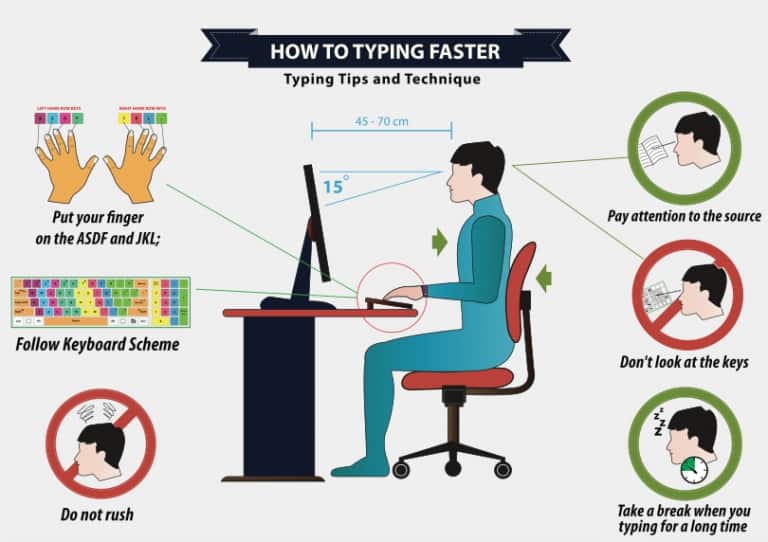
The foundation of efficient typing lies in the home row position. This is where your fingers should rest when you're not actively typing. Here's how to position your hands:
Left hand: Place your left pinky on 'A', ring finger on 'S', middle finger on 'D', and index finger on 'F'
Right hand: Place your right index finger on 'J', middle finger on 'K', ring finger on 'L', and pinky on ';'
Thumbs: Both thumbs should rest on the spacebar
Most keyboards have small raised bumps on the 'F' and 'J' keys to help you find the home row position without looking. These tactile markers are your guide to proper hand placement.
Each finger is responsible for specific keys on the keyboard. Here's the standard finger-to-key mapping:
Pinky: Q, A, Z, and the left Shift key
Ring finger: W, S, X
Middle finger: E, D, C
Index finger: R, T, F, G, V, B
Index finger: Y, U, H, J, N, M
Middle finger: I, K, comma (,)
Ring finger: O, L, period (.)
Pinky: P, semicolon (;), slash (/), and the right Shift key
Good typing technique starts with proper posture. Here are the key elements:
Sit up straight: Keep your back straight and shoulders relaxed
Feet flat on the floor: Both feet should be flat on the ground
Elbows at 90 degrees: Your elbows should be bent at approximately 90 degrees
Wrists straight: Keep your wrists in a neutral position, not bent up or down
Monitor at eye level: The top of your monitor should be at or slightly below eye level
Muscle memory is the key to fast, accurate typing. Here's how to develop it:
When learning to type, speed should be your last concern. Focus on hitting the correct keys with the correct fingers. Speed will develop naturally as your muscle memory improves.
Consistency is crucial for building muscle memory. Even 15-30 minutes of daily practice is more effective than long, infrequent sessions. Use our free typing tests to practice regularly.
This is one of the most important rules for developing muscle memory. If you find yourself looking at the keyboard, slow down and focus on feeling the keys with your fingers.
Here are the most common mistakes beginners make and how to avoid them:
Using only one or two fingers to type (hunt and peck) severely limits your speed potential. Commit to using all ten fingers from the beginning.
Constantly looking at the keyboard prevents you from developing muscle memory. Use the tactile bumps on F and J keys to orient yourself.
Don't stretch your fingers to reach distant keys. Instead, move your entire hand to position the correct finger over the key.
Focus on accuracy first. Speed will come naturally as your technique improves. Rushing leads to bad habits that are hard to break later.
Here are some effective practice exercises to improve your typing technique:
Start by practicing the home row keys: ASDF and JKL;. Type these keys repeatedly until you can do it without looking.
Practice typing exercises that focus on specific fingers. For example, type "qwerty" to practice your left hand, then "yuiop" for your right hand.
Practice common word patterns and letter combinations. This helps you develop the muscle memory for frequently used sequences.
Regular typing tests are essential for tracking your progress and identifying areas for improvement. Here's how to use them effectively:
Take tests regularly: Use our 1-minute typing tests daily to track your progress
Focus on accuracy: Aim for at least 95% accuracy before worrying about speed
Analyze your mistakes: Pay attention to which keys you miss most often and practice those specific combinations
Set realistic goals: Start with a goal of 20-30 WPM and gradually increase as you improve
Once you've mastered the basic techniques and can type accurately, you can start focusing on speed:
Increase practice time: Gradually increase your daily practice sessions
Use timed exercises: Set a timer and try to type as many words as possible in that time
Practice with different texts: Use various types of content to improve your adaptability
Track your progress: Keep a record of your WPM and accuracy to see your improvement over time
Once you've mastered the basics, you can work on these advanced techniques:
Develop a steady rhythm while typing. This helps maintain consistency and reduces fatigue.
Learn to anticipate the next letter or word, which helps you prepare your fingers in advance.
Keep finger movements to a minimum. Only move the necessary finger to reach each key.
Mastering proper typing techniques takes time and practice, but the benefits are worth the effort. By following these guidelines and practicing regularly with our free typing tests, you'll develop the skills needed to type efficiently and accurately.
Remember, the key to success is consistency. Practice a little every day, focus on accuracy first, and be patient with yourself. With dedication and the right techniques, you'll be typing like a pro in no time!
Ready to start practicing? Take our free typing test today and begin your journey to better typing skills!
Typing Test Online: Top 5 Free Practice Sites (Updated 2025) Want a quick, accurate typing test online to boost your speed and confidence? You are in the right...
Did you know that the average office worker spends about 6 hours a day on a computer, with typing taking up half that time? Slow typing can cut your productivity by up to 20%, limiting how fast you finish emails, reports, or code. But here's the good news: typing speed is a skill anyone can build, like learning to ride a bike. It just needs the right steps. This guide shares 10 proven ways to boost your words per minute (WPM), from basic fixes to pro tips. Whether you're just starting or hitting a wall at 60 WPM, these methods work for all levels. Let's dive in and get your fingers flying.
How To Increase Your Typing Speed In today’s fast-paced digital world, typing has become one of the most essential skills for students, professionals, a...