
Loading workspace
Loading workspace
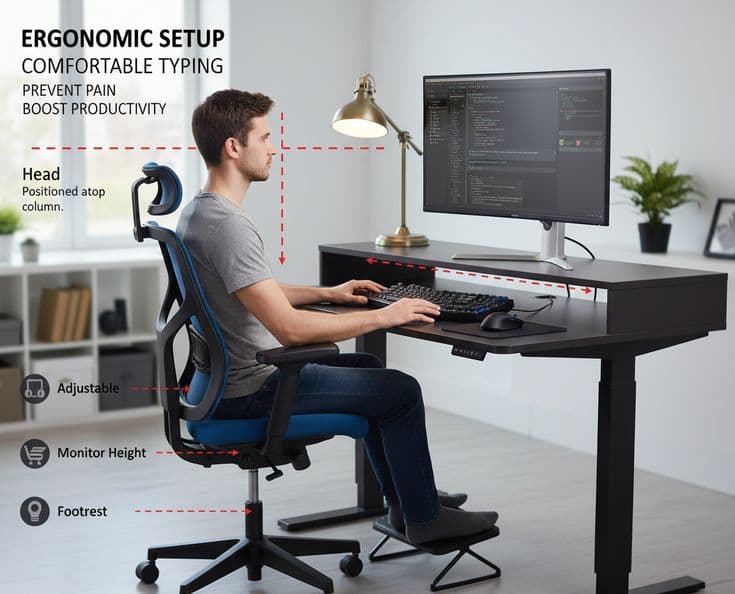
Ergonomic Setup for Comfortable Typing — Prevent Pain & Boost Productivity By Your Name • November 13, 202...
Typing for hours doesn't have to mean aches, fatigue, or wrist pain. With a few adjustments to your chair, desk, keyboard, and habits, you can type longer and more comfortably. This post covers practical ergonomic tips, product recommendations, and a quick checklist to optimize your workspace today.
Neutral posture: Keep wrists straight, elbows at ~90°, and shoulders relaxed.
Alignment: Center the keyboard and monitor so you don't twist your neck or torso.
Movement: Take micro-breaks, stretch, and change positions frequently.
Chair height: Feet flat on floor, knees at hip level or slightly lower. Use a footrest if needed.
Desk height: Forearms parallel to the floor when typing; adjust desk or chair accordingly.
Keyboard placement: Place the keyboard directly in front of you about 4–6 inches from the desk edge; consider a negative-tilt keyboard tray.
Monitor position: Top of the screen at or slightly below eye level, about an arm's length away.
Mouse & accessories: Keep the mouse close to the keyboard; use wrist rests only for breaks, not while typing continuously.
Ergonomic keyboards
Split, tented, or low-profile keyboards reduce wrist deviation.
Vertical mice
Keep the wrist in a handshake position to reduce pronation strain.
Adjustable chairs
Look for lumbar support, seat depth, and adjustable armrests.
Monitor arms
Easily adjust screen height and angle for better neck alignment.
Every 20–30 minutes, take 30–60 seconds to stand, shake your hands, and stretch. Try these quick moves:
Wrist flexor and extensor stretches.
Shoulder rolls and neck tilts.
Finger spreads and grip relaxations.
Are feet flat on the floor or on a footrest?
Are elbows close to a 90° angle while typing?
Is the monitor centered and at eye level?
Is the keyboard placed to avoid reaching and twisting?
Do you get short breaks every 20–30 minutes?
Share this guide with coworkers or students who type a lot. For more workspace tips, visit Your Blog.